Merchants can’t see your app, not because your app is not good. But because you couldn’t find out the exact potential keywords that Shopify merchants search for. If you do proper keyword research for Shopify app marketing, your app will dominate in the Shopify App Store, Google, and other LLM chatbots.
You have great features on your Shopify app, a clean UI, and fair pricing. But without properly positioning your app, merchants won’t find your app. So, the app will be invisible, and you will lose confidence and motivation.
Last month, I was talking to an app founder who gained 600 merchants in the last 1.9 years. He guessed search terms and copied from competitors. Then run ads and waste money.
You may also find a similar scenario where users are clicking on your app but not installing it. This is a clear signal that you have targeted the wrong audience.
You spend time writing content for SEO and optimizing pages for ASO, but nothing moves.
Don’t worry, you are in the right place. I’ll show you how to find keywords that real Shopify merchants actually search for. Step by step. Simple methods. No fluff.
By the end, you’ll know how to attract high-intent visitors, rank faster, and turn searches into installs, without wasting time or budget.
How to Do Keyword Research for Shopify App Marketing
Keyword research for Shopify app marketing is not one single task. It has two different types, but both are equally important.
- Keywords for Shopify App Store listing optimization and app store ads.
- Keywords for external content marketing (e.g., SEO, AEO, YouTube, Reddit, etc).
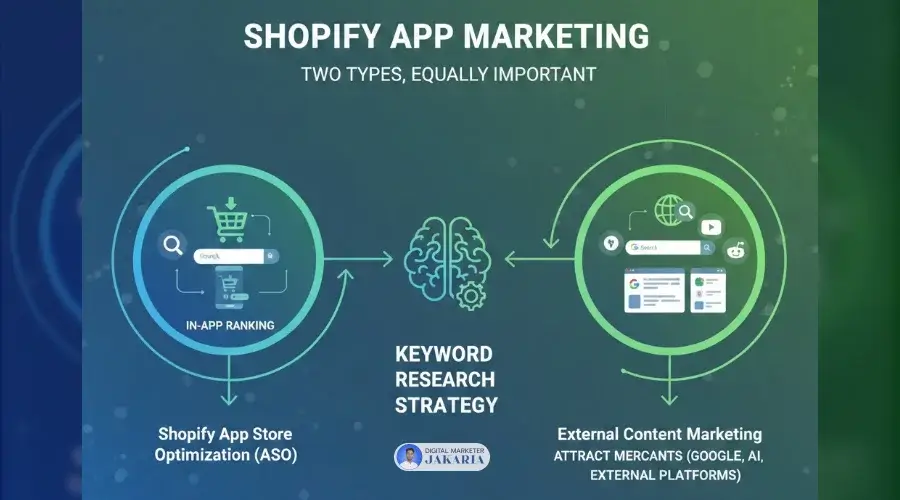
One helps you rank inside the Shopify App Store. The other helps you attract merchants from Google, AI tools, and external platforms.
If you mix them up, you lose focus and won’t attract potential customers. If you do both correctly, growth becomes predictable. Let’s break them down step by step.
Keyword Research for Shopify App Store Optimization
Before starting keyword research for your Shopify app listing, it is not only about optimization. It’s a way to help merchants discover your app on the App Store. So, think about how you can help store owners to discover your app among 1500+ apps. Here is the step-by-step guide:
Step 1: Identify Your App Category
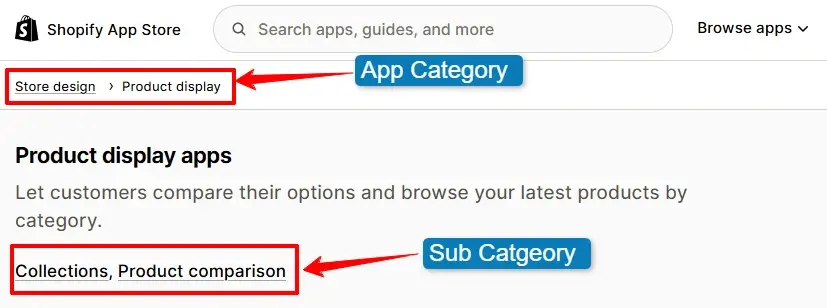
Start with one clear problem your app fixes. I’ve seen apps fail because they tried to solve too many things in one app. Choose one main category that matches the merchant’s intent and can solve their real problem. This clarity makes every keyword decision easier later.
For example, don’t target keywords like “marketing and conversion apps” or “store management.”
You can target a more specific category like “email marketing” or “analytics.”
If you do this, there will be lower competition, and you will get high-intent merchants who actually need your app.
Step 2: Search App Category as Keywords
You have identified your app category at step 1; now, go to the Shopify App Store and search for your category name. I always do this first to see which apps appear and how Shopify labels them. This demonstrates how Shopify understands your category and identifies the keywords that already trigger visibility.
Step 3: Look for Keywords Your Competitors Are Ranking For
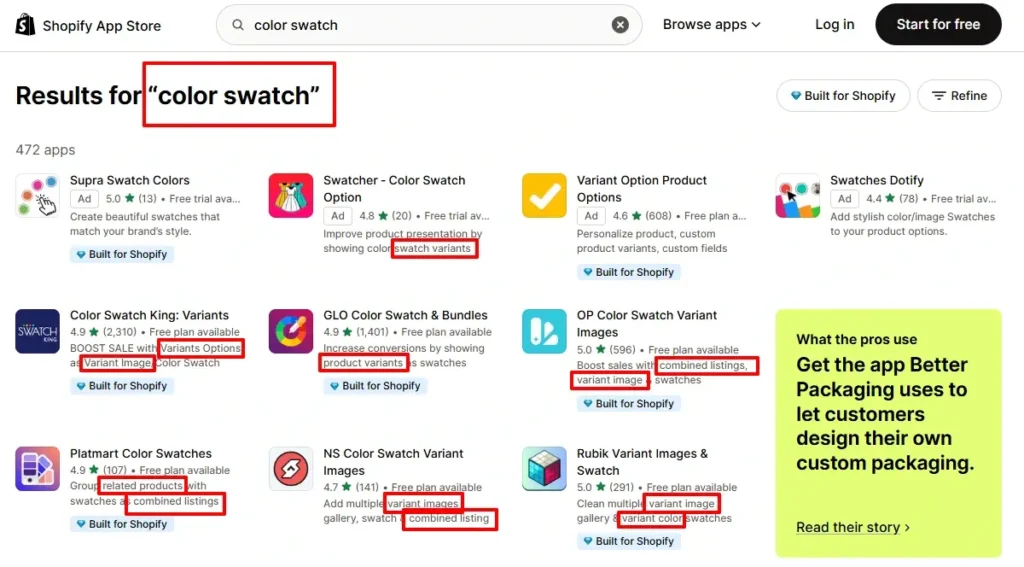
Open the top apps and read their names, app cards, subtitles, feature lists, and descriptions. I regularly find hidden keyword ideas here. If many competitors use the same terms, that means merchants are actively searching for those. So, you can pick them as a draft for your final keyword list.
Step 4: Use Shopify App Store Search Suggestions
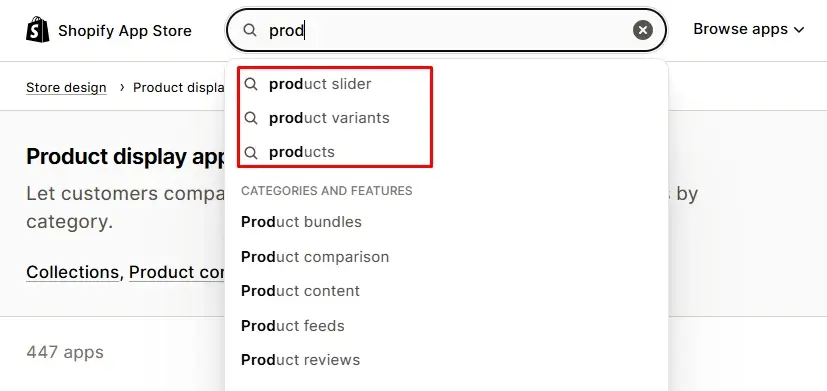
Type your seed keyword into the Shopify App Store search bar and watch the suggestions appear. They come from real merchant searches and reveal high-intent keywords. Shopify already understands, trusts, and ranks apps for those keywords for that category.
Step 5: Leverage the “Search Term” of Shopify Partner Ads
Run a small Shopify Partner ad with the ‘broad match‘ condition and check the “Search Term” report. Shopify shows the exact phrases merchants typed before clicking your app. These are real, high-intent keywords. I often discover hidden gems here that don’t appear in tools or suggestions.
Pro Tips: If you don’t have a budget, don’t worry; you can set very low bids. Your app will not appear in front of merchants with low bids, but you will get hidden search terms.
Step 6: Select 2 Primary Keywords for Your App
Now you have 15-20 keywords from the app category, your competitors, and Shopify search suggestions. Now pick two strong, high-intent keywords that clearly describe your app’s main job. Moreover, ensure that they have lower competition and align with your app.
You know, you will have only 30 characters for the app name and 62 characters for the app card. So, you will need to optimize the Shopify app name and app card with these 2-3 primary keywords.
Step 7: Select 3 More Relevant Keywords
Now look for longer phrases to optimize the Shopify app listing on the entire page. Long-tail keywords have less competition and stronger intent. New apps perform better initially before targeting short, competitive keywords later.
Step 8: Choose a Few Additional Keywords
Select a few supporting keywords related to features or use cases. You need to use these keywords in the longer description, in the feature list, and in the listing where you have more space. I avoid repeating keywords to ensure the listing page has natural and user-friendly copywriting. These help Shopify understand the depth of your app and match it with more specific merchant searches.
Step 9: Validate Keywords with Real Search Results
Search each keyword manually. I always do this before finalizing. If the results don’t match my app type, I drop the keyword. Relevance beats volume every time on the Shopify App Store.
Bonus Tip: Use a Keyword Research Tool Like Ranksy
When I want deeper insights, I use tools like Ranksy. It saves time and shows ranking keywords from competitors’ apps across the app store. Remember, tools don’t replace thinking, but they help validate decisions faster with real data.
Note: This tool is in the early phase, which is why it may have a few bugs. But I have talked to the developer of the Ranksy, and he assured me that he is working hard to improve it.
Keyword Research for External Content Marketing
Most of the Shopify app founders rely entirely on the Shopify App Store. But you know, there are 15000+ apps right now, and it is becoming too competitive day by day. Also, the Shopify App Store ad cost is rising.
So, relying solely on the App Store is a great mistake in 2026. I made the same mistake in the beginning for Shopify app marketing. But later, I noticed something interesting.
Most installs were not coming only from the App Store. They were coming from Google, YouTube, communities, and even AI tools like ChatGPT.
Merchants don’t always search inside Shopify first.
- They search on Google.
- They watch YouTube videos.
- They ask questions on Reddit.
- They ask on Shopify communities.
- They use AI tools to find their solutions.
That’s why external keyword research is just as important as ASO to do perfect content marketing for Shopify apps. If you ignore this, you lose thousands of potential installs.
Let me show you how I do it effectively.
SEO Keyword Research for Google (Blogs & Website Content)
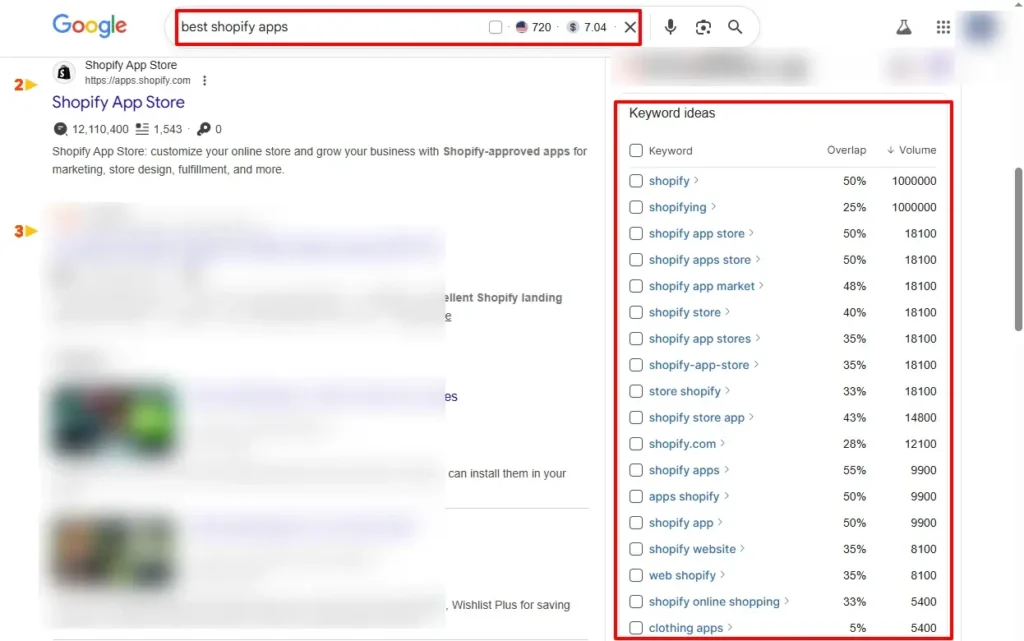
Google remains the largest organic traffic source for B2B SaaS businesses. Every day, merchants search for solutions like “best review app for Shopify store” or “how to increase Shopify sales.”
And the biggest benefit for the Shopify app is that merchants from Google are more educated than others. They already read your blog posts and content, so they know how to use them. That’s why the uninstall rate will be very low.
I treat Google like a long-term growth machine. One good article can bring installs for months without ads. But not all keywords are the same. Each type has a different intent.
Here is how I do Keyword Research for Google and AI LLMs:
Step 1: Use SEO Tools Like SEMrush, Ahrefs, or Ubbersuggest
I always start keyword research with real data like my app’s seed keyword, not just guessing.
Tools like Ahrefs, SEMrush, and Ubersuggest show me what merchants are actually searching for. I check search volume, keyword difficulty, and traffic potential. This saves time and avoids writing content nobody searches for.
If you use these tools, you need to type your main keywords like “Shopify SEO app,” “upsell app,” or “Shopify email marketing.” And you will get hundreds of keywords within a minute. Then you can filter the list by difficulty, search volume, intent, and more.
Step 2: Find Out Low-Hanging Fruits (Long-Tail Keywords)
If you are just starting external marketing for your Shopify app, you won’t rank for competitive keywords. So, you don’t need to chase high-volume and short-tail keywords.
Instead, you can go after long-tail keywords. These are longer and more specific keywords that merchants often search for. Like “best SEO app for small Shopify clothing stores” or “free store design app for beginner seasonal dropshippers.” Less competition. Faster ranking.
These keywords bring in lower traffic but higher conversions. Perfect for early growth.
Step 3: Problem-Based Keywords (Pain Point Research)
Remember that Shopify merchants are not looking for your Shopify app. They are searching for a solution for their store. So, there is a high chance that they will search for their problems.
So, try to find out their problems, like “how to reduce Facebook ad cost to increase revenue,” or “why my store has a low conversion rate.” They will never search for “boost AOV with our app XYZ.“
Here, I always focus on the merchant’s pain points first. Where to find these types of problem-based keywords or content ideas? I list common struggles from Shopify communities, forums, Facebook groups, Reddit, and support tickets.
Then I turn each problem into a blog topic. This builds trust fast because you’re solving real issues, not just promoting your app.
Step 4: Branded & Competitor Keywords
Identifying branded and competitor keywords is one of the fastest ways to achieve a quick win. If anyone searches your app name or your brand name directly, that means they already know you. You just need to convert them into your customers.
Not only that, if someone searches your competitor’s name, they are also already ready to install something. They are not cold traffic. They are warm buyers.
You can find this type of branded keywords by searching on keyword research tools. Just search your competitor’s brand name on SEMrush or Ahrefs to see if anyone is searching for it. This is a golden opportunity for you.
Here is how to write content with competitors’ names or branded keywords:
Step 5: Comparison & Alternative Keywords
Create pages or blog posts like “Top alternatives to X app” or “X vs Y comparison.” These posts rank easier and convert better because users are already comparing tools. From my campaigns, competitor pages often bring the highest install rates.
When people type “best,” “top,” “vs,” or “alternative,” that means they are already in decision mode. They just need help choosing. So you need to guide them and convince them to use your app by informing them why your app is best for their needs.
Show pros, cons, pricing, and use cases. Don’t over-promote or over-promise; just clarify them. Google loves this format, and users trust it more.
This strategy has consistently brought me high-intent traffic for every Shopify app project I’ve worked on
Step 6: Commercial Intent Keywords (Landing Pages & Ads)
Commercial intent keywords are also high-opportunity keywords for your app. Because people are ready to buy just need to show your app in front of them. These keywords are perfect for a landing page and promoting the page with ads campaign.
For example, “Shopify review app pricing,” “best upsell app costs,” or “Bundle app’s ROI.” These searches show clear intent. So I never send them to blogs.
I create focused landing pages instead. Where I show up, clear benefits, screenshots, and social proof, with a strong CTA. They won’t love to read to learn something; they need clarification to take action. These pages usually convert the best.
Step 7: AEO and AI Search Keywords (ChatGPT, Perplexity, Gemini)
This is the last but not least step in keyword research for your Shopify app. You know, the search is changing fast. Now merchants are more likely use AI Chatbots than traditional ones in Google search.
Now merchants ask full questions inside AI tools instead of typing short keywords. So you need to optimize for answers (AEO), not just rankings.
I write content in simple language. Clear headings. Direct answers. FAQ sections. Step-by-step guides and conversational tone. This helps AI tools pick up my content and recommend it.
In 2025(Jan-Dec), I’ve seen traffic coming directly from AI platforms and got 547 installs from ChatGPT & Perplexity. This trend will only grow. So optimizing for AEO now gives you an early advantage.
Keyword Research for YouTube Videos
YouTube is like a hidden goldmine for Shopify apps. Many merchants prefer watching instead of reading blog posts. Before installing an app, they search for tutorials or demos on YouTube.
I always type my keywords directly into YouTube search and look at suggestions. Those suggestions show real searches; competitors’ views count. Here, I get a sense of whether people are actually looking for these solutions.
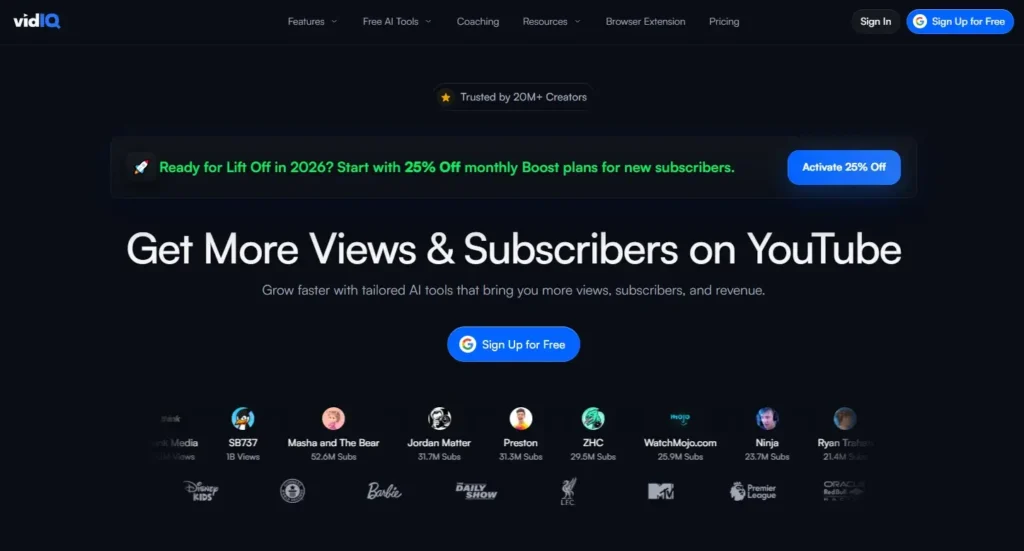
YouTube keyword research tools like TubeBuddy or VidIQ help me to identify the best keywords within a short time. Also, these tools help to show the competition, search volume, and more insights for the keyword.
Then I create videos like “How to set up a review app on Shopify,” “Best Shopify apps for beginners,” etc. Simple screen recordings work fine. But screen recording with face works best, because it builds trust and your brand value. No fancy editing needed.
One good video can bring in installs every day. Sometimes even more than blogs. So don’t ignore YouTube. It’s the second biggest search engine.
Conclusion
Keyword research for Shopify app marketing is not optional anymore. In this competitive marketplace, strategic keyword research has become the foundation of your app marketing.
If you target the wrong keywords, your app stays invisible. You won’t attract any traffic, any installs, and $0 revenue.
But when you choose the right keywords, everything changes. Your app ranks higher. More merchants see you. Installs grow naturally.
So, start with Shopify App Store optimization by using the appropriate keywords. Then expand into Google SEO, blogs, and content marketing to ensure your Shopify app’s growth.
I’ve seen this firsthand while optimizing Shopify apps and listings. Simple keyword tweaks increased visibility, installs, and even paid conversions.
So don’t guess. Research. Validate. Optimize.
Because the right keywords don’t just bring traffic. They bring the right merchants. And that’s what truly grows your Shopify app.
If you are still confused about where to start your keyword research for the Shopify app:
FAQs
What is “Search Term” in the Shopify App Store?
A search term is the exact keyword a merchant types before clicking your app. You can see this inside Shopify Partner Ads reports. Shopify allows you to see these terms that ensure real buying intent. I use them to find hidden, high-converting keywords for listings page optimization.
How Do I Find Keywords to Promote a Shopify App?
Start keyword research inside the Shopify App Store. Check search suggestions, competitor listings, and ad search terms. Then use tools like Ahrefs or SEMrush for external SEO. Moreover, you can combine both to get better keywords for installs and long-term organic traffic.
What is Shopify App Store Optimization (ASO)?
Shopify ASO means optimizing your app name, subtitle, description, visuals, and keywords to rank higher inside the App Store. Better rankings bring more visibility and installs to your Shopify app. It’s like SEO, but for the Shopify App Store marketplace.
How Many Keywords Should I Target for My Shopify App?
Focus on 2–3 primary keywords for your app name and subtitle. Then add 5–10 secondary keywords in descriptions, search terms, feature lists, and content. Too many keywords look spammy. Clear and relevant keywords work better and convert more merchants.
Should I Use Different Keywords for Google SEO and Shopify ASO?
Yes, you can do it. Shopify ASO targets short, high-intent keywords like “SEO app” or “review app.” Google SEO targets longer phrases like “best Shopify SEO app guide.” Both channels work together to bring steady installs from different sources.