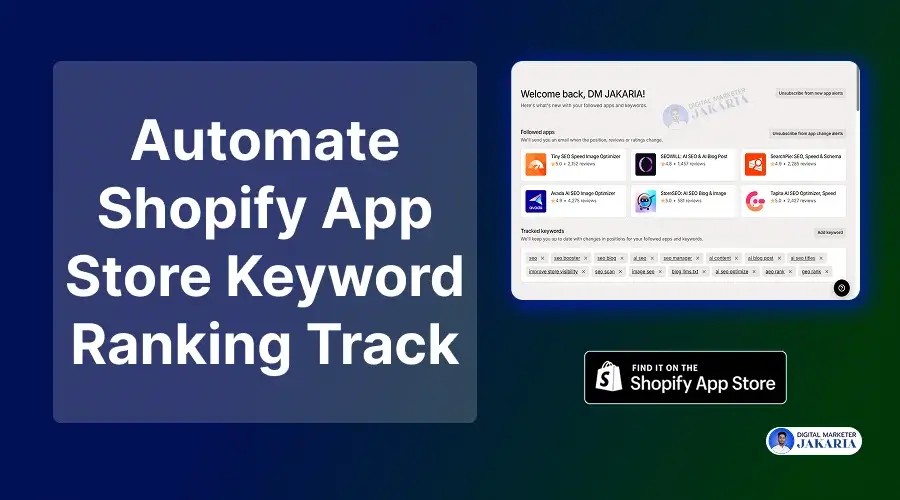
I had been spending 5-7 hours per week before I automated the Shopify app store keyword rank tracking. Yes, this free tool is helping me to save time and get an organized report every day.
If you are serious about growing a Shopify app, you must know your app’s position on the Shopify app store. Because, to date, the Shopify app store remains the primary customer source for all successful Shopify apps.
But manually checking keyword ranking and tracking them is very time-consuming. Also, keeping track of your app’s and your competitor’s ranking positions is quite difficult.
That’s where I found an amazing tool, ‘Shopify App Store Index’ (SASI), which helps me keep everything recorded.
- Daily keyword ranking changes.
- Daily category ranking changes.
- Achieved new reviews or archived published reviews.
- And competitors’ rankings.
- Weekly new app launches on the Shopify App Store.
In this guide, I will show you exactly how I have automated the Shopify App Store keyword ranking report for free.
How to Automate Shopify App Store Keyword Rank Tracking
Automating your Shopify app store keyword rank tracking system does not require any fancy tool like n8n, Make, or Zapier. Without any complex setup or technical knowledge, I have used this simple system to monitor my app’s visibility.
Below is the exact process I follow:
Step 1: Create an Account on Shopify App Store Index (SASI)
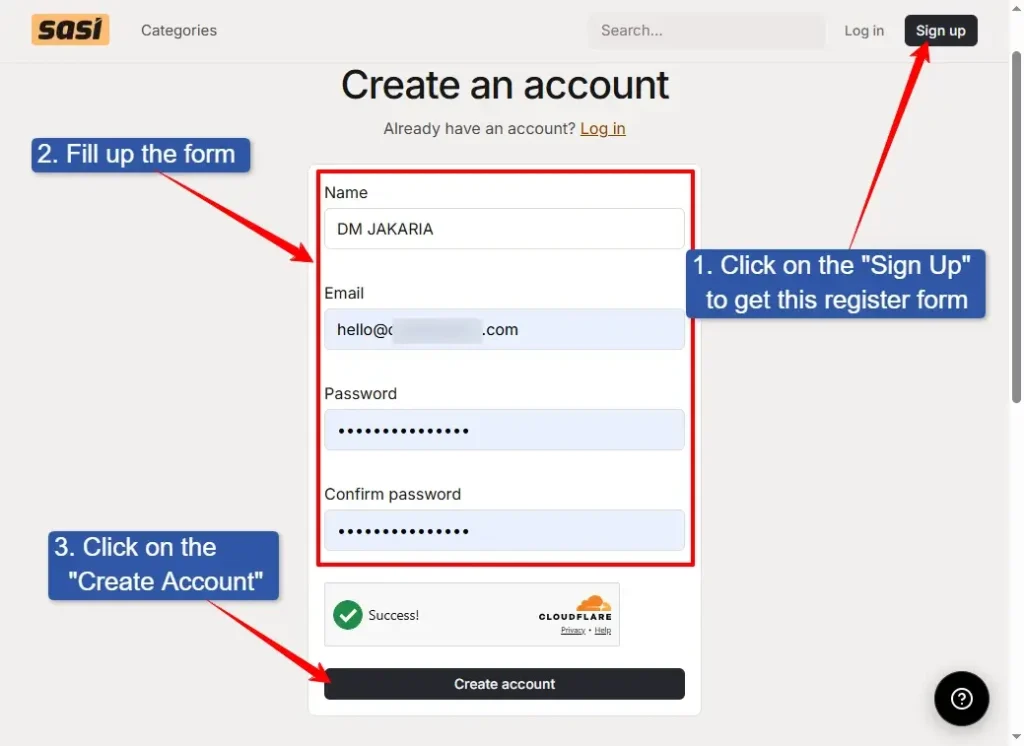
- First, create your free account on the Shopify App Store Index SASI by Mantle.
- Click the “Sign up” button.
- Fill out the registration form with your name, email, and password.
- Then click on the “Create account” button.
Note: Check your email, if SASI asks to verify your account, verify using the link or OTP.
Pro Tip: I would like to suggest your using your primary business email, so that you won’t forget to check your app ranking.
Step 2: Search for Your App Name in the SASI Search Bar
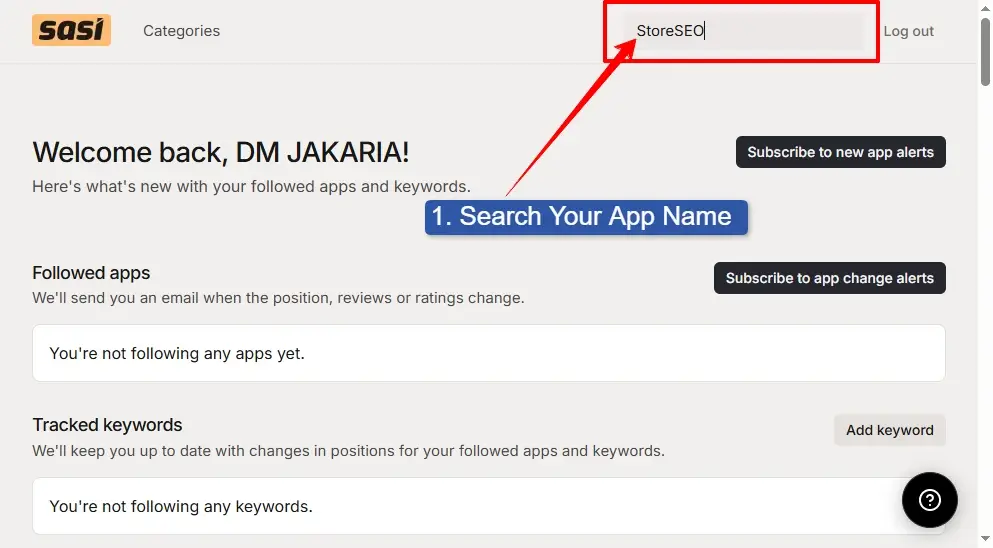
- Now, you are on the SASI dashboard.
- At the top right corner, you can see a search bar. Type your Shopify app name in the search bar and hit the “Enter” button.
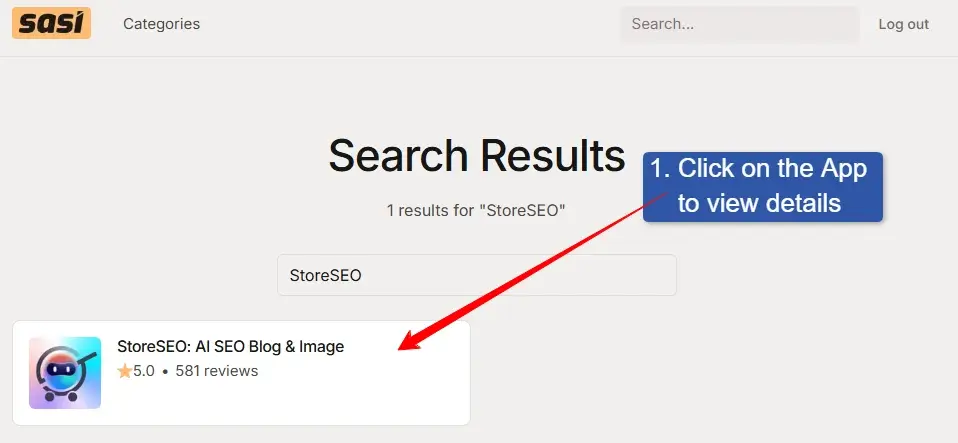
Step 3: Click on Your App to View Details
- You can see your app in the search results.
- Click on the app to view details about the app, and follow any updates to the app changes.
Step 4: Follow the App and Go Back to the Homepage
- On this page, you can view your app category position and review changes over time.
- Click on the “Follow App” button.
- Then go back to the SASI dashboard.
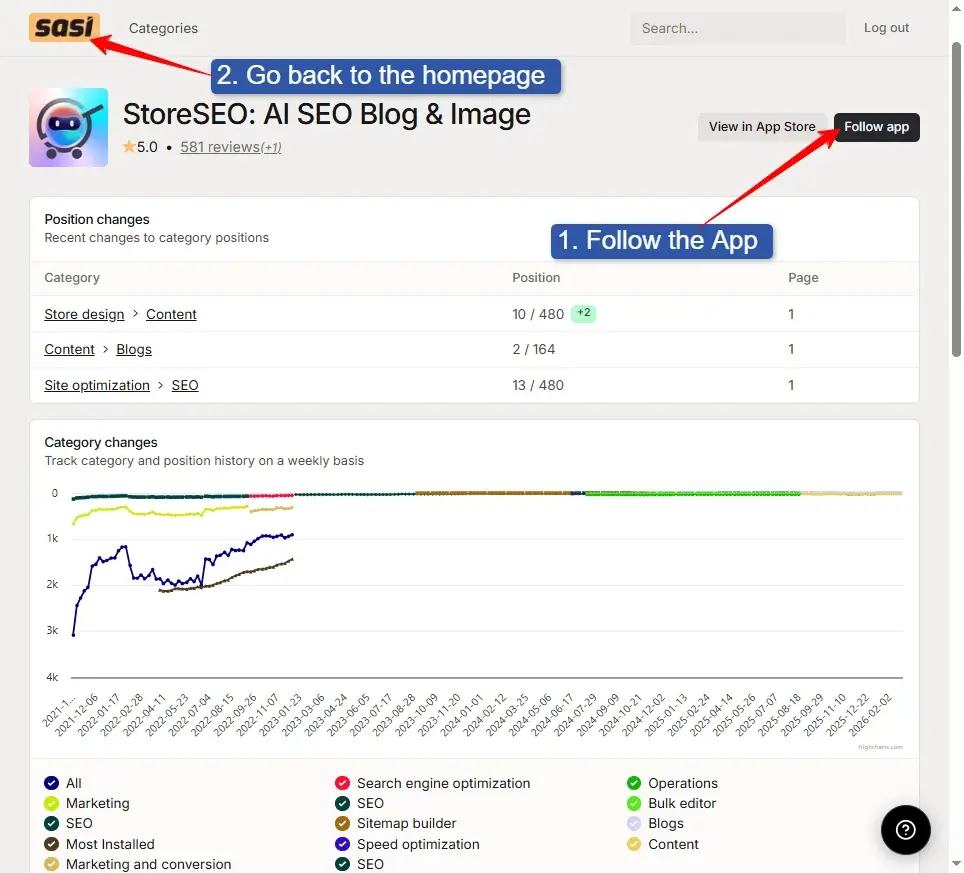
I use this page to understand where my app currently stands before tracking keywords.
Step 5: Click on the “Add Keyword” Button to Track Keywords
- Now you have your Shopify app on your “Followed Apps” list. It’s time add keywords.
- Click on the “Add Keyword” button to add a keyword that you want to monitor.
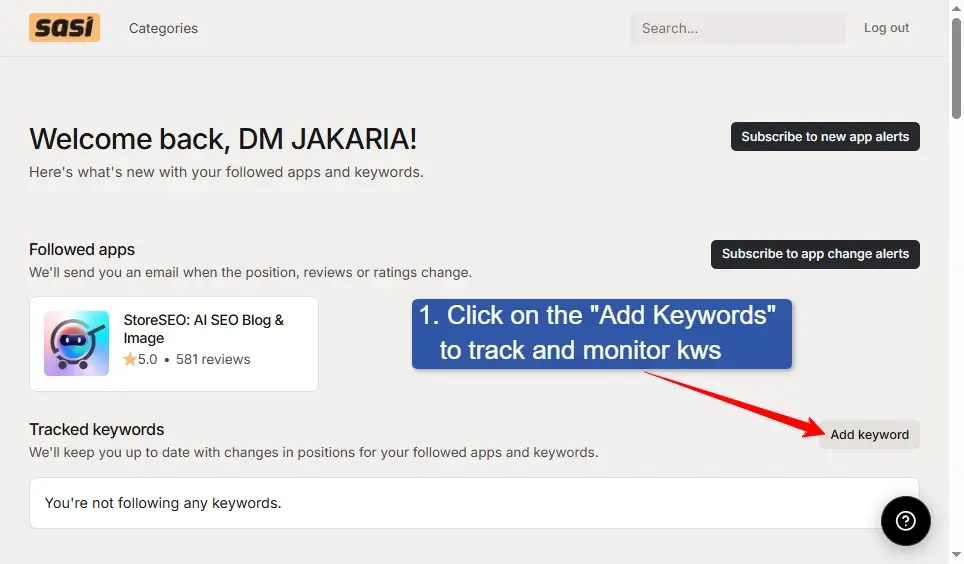
Step 6: Add Your Keywords that You Want to Track
- Type the keyword that you want to track.
- Click on the “Track Keyword” button.
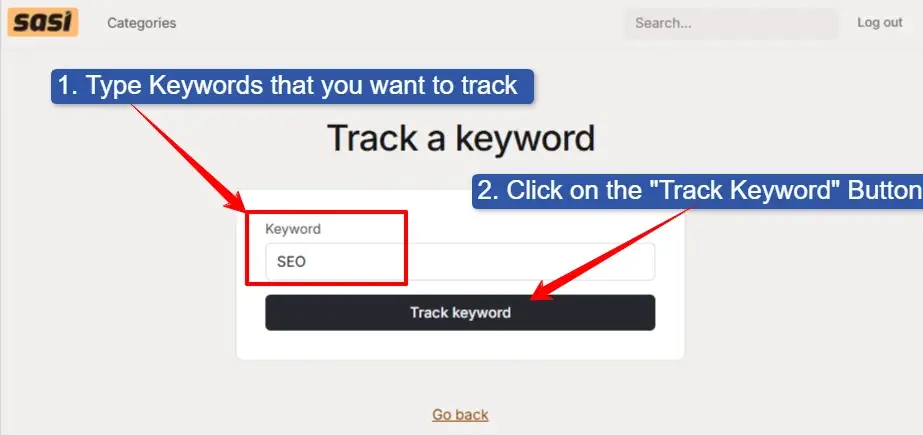
Step 7: Add All Keywords (list) that You Want to Track
- Following steps 5 and 6, add more keywords that you want to track. Click on the “Add Keyword” button, type a keyword, and click on the “Track keyword” button. Following the same process, add all keywords that you need to track.
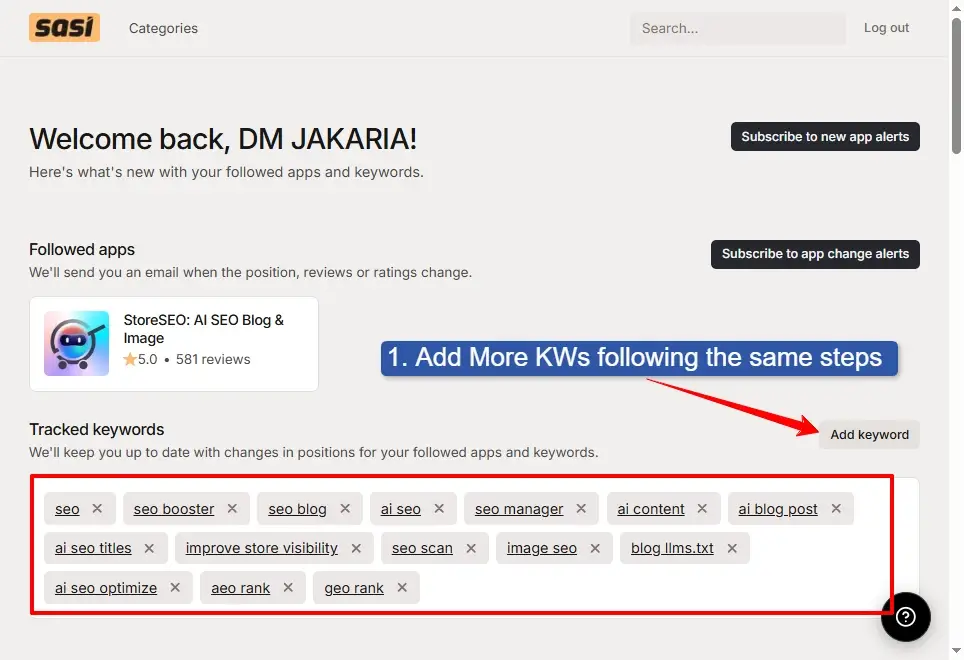
Finally, you have followed your app, and all keywords that you are targeting to rank or track.
Step 8: Subscribe to App Change Alerts
- Click on the “Subscribe to app change alerts” button to get an email report every day.
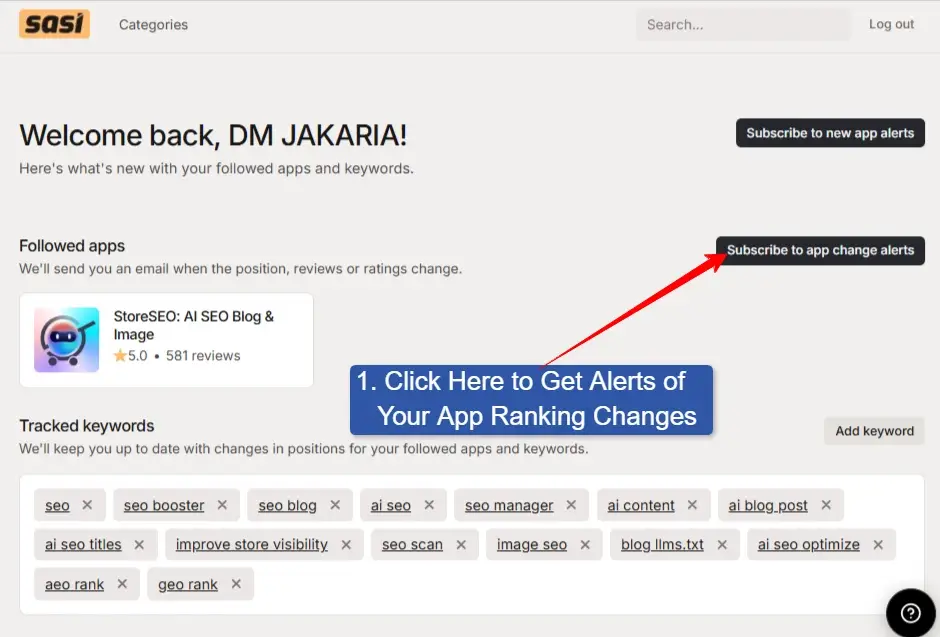
Now you will get an email every day for your app’s ranking on those keywords you have added to the list.
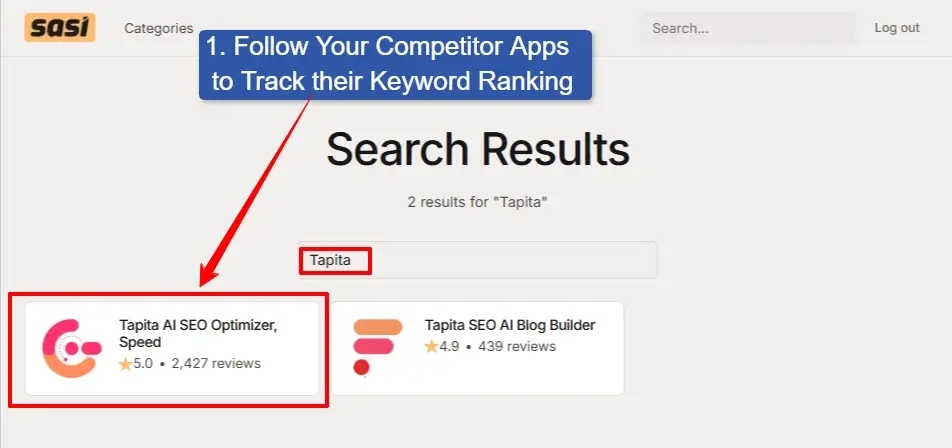
Step 9: Follow Your Competitor Apps to Track Their Positions
- Follwoing the step 2, 3, and 4, you can follow more apps of your competitors.
- For example, I have followed “StoreSEO” as my app, and now I am following “Tapita AI SEO” as my competitor. Following the same process, you can add all of your competitor apps.
Step 10: Check Everything Set Perfectly
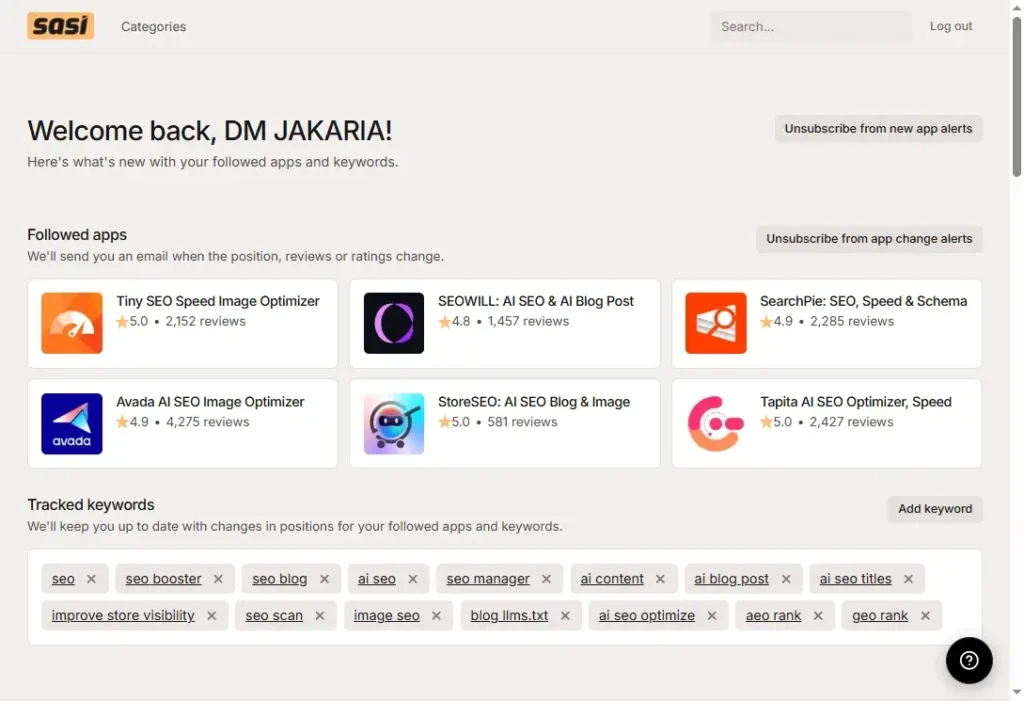
Let’s check everything you have set properly, or anything missing. Here are things you need to check:
- Ensure you have followed your app.
- You have followed all competitor apps.
- Added all keywords that you want to track.
- Subscribed to the app change alerts.
- Subscribed to the “New App Alerts”, if you want to check all new app launches per week. (Optional)
Final Shopify App Store Keyword Rank Tracking Report
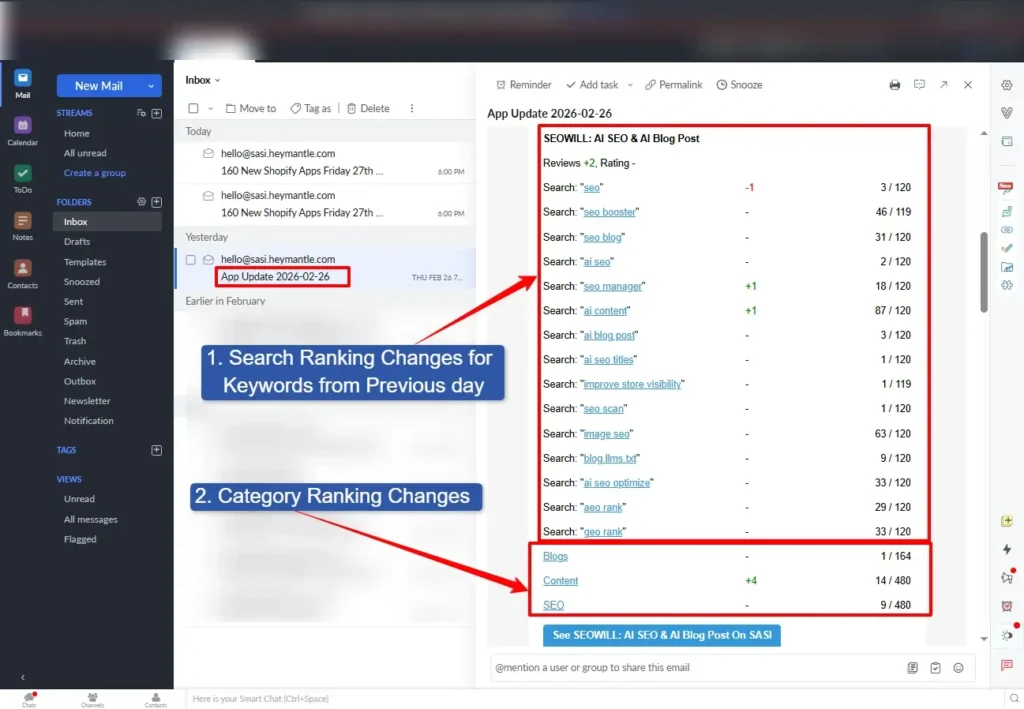
SASI sends the Shopify app store keyword ranking report once a day. So, you might not get the email when you are setting up the system. Within 24 hours, you will get your first email report from SASI.
- In the first column, you can see the keyword list.
- Second column, keyword position changes from the previous day.
- Third column, position of the keyword on the search result.
- At the bottom, you can see the app ranking in the category.
Conclusion
Now you have reached the end of the blog post about the Shopify app store keyword rank tracking system using SASI. In this blog, I have mentioned how to automate the keyword tracking system for free with a few simple steps.
If you follow these 10 steps to automate your keyword monitoring system, it will take 10 minutes. But the system, SASI, will save you 5-7 hours every week.
Before using the automated tracking system, I relied on manual checks. It was very inconsistent. Sometimes, I missed ranking drops. Competitors outranked me without any notice.
After using this simple free tool, I always stay updated about my Shopify app’s keyword ranking, category ranking, competitor’s position, etc.
If you want to improve your keyword ranking on the Shopify app store, I can help you!
FAQs:
How to Research Keywords for the Shopify App Store?
Before starting keyword research for the Shopify app store, you must understand the deep intent of merchants. I always begin by typing seed keywords into the Shopify App Store search bar and analyzing autocomplete suggestions. These suggestions are verified by Shopify and reflect real searches from merchants.
Then, I open top-ranking competitor apps and identify repeated phrases in their titles and descriptions. I also track which keywords appear frequently in successful apps within my category. So, you can focus on high-intent keywords that indicate a merchant is ready to install, not just browse.
Is There Any Way to Track Keyword Ranking Automatically on the Shopify App Store?
Yes, there is an effective way to automate keyword tracking for the Shopify app store. Instead of manually checking rankings every day, I use the keyword tracking tool SASI to monitor keyword positions.
Once you have added keywords and enabled the email alerts, the system will track ranking automatically. Using this system, I receive updates when positions change, which helps me react quickly. Automation saves time and ensures I never miss a sudden drop or competitor improvement.
Is SASI by Mantle Really Free for Keyword Tracking?
Yes, SASI offers free keyword tracking features. I personally use it to follow my app, monitor competitors, and track keyword rankings without paying. For early-stage and growing Shopify apps, the free features are powerful enough to build a solid optimization strategy.
How to Optimize the Shopify App Store Listing Page?
You can start your Shopify App Store listing page optimization by identifying primary and secondary keywords. Then, include your primary keyword naturally in the title and subtitle, and description clearly.
Also, place keywords on the feature list, pricing section, and everywhere you can place them naturally. Additionally, visuals and reviews are equally important for optimizing your app listing page.
Note: Don’t do keyword stuffing on the Shopify app store; keep it natural. Once I had added 3 keywords to the app card (62 characters), without any natural meaning. Then the Shopify app team noticed it and sent an email with a warning to delist my app.
How Many Keywords Should I Track for the Shopify App Listing Page?
I recommend starting with 15 to 30 focused keywords. These should include your main category keyword, feature-based keywords, and a few competitor keywords. Tracking too many keywords in the beginning can create noise.
I prefer starting with a clean list of high-intent terms and expanding gradually as I gather data. The goal is clarity, efficiency, and impact of your Shopify app marketing, not volume.
How Often Should I Check Keyword Rankings on the Shopify App Store?
You don’t need to manually check your keyword ranking on the Shopify app store. You can automate the Shopify app store keyword rank tracking using the SASI to get an email every day.
Since I use automated alerts, I don’t need to monitor them daily. If there is a major ranking drop or competitor movement, I get notified. A weekly deep review combined with automated tracking is the most efficient system. It keeps me informed without wasting time.