Understanding Shopify App Store search terms is very important for your app to get discovered by merchants. I’ve seen great Shopify apps fail simply because they didn’t align with how merchants search inside the Shopify App Store.
You may have strong features. You may have solid reviews. But if your listing doesn’t match the exact words merchants type, your app ranking and growth slow down. Discovery in the App Store is search-driven. Visibility starts with the right terms.
Shopify App Store search terms are the keywords merchants enter in the App Store search bar to find solutions. These terms reflect real problems, desired outcomes, and feature needs.
You need to identify and optimize your app listing page by placing high-intent terms in your listing in the merchant’s language. When relevance improves, rankings and installs follow.
In this guide, I’ll break down the exact strategy I use to identify, validate, and optimize search terms for Shopify apps. If you want predictable install growth, keep reading.
What Are Shopify App Store Search Terms?
Shopify App Store search terms are the exact words merchants type into the search bar to find apps. These search terms are not random keywords. These represent real problems, desired outcomes, and buying intent. Understanding these terms is essential for increasing your app visibility, rankings, and driving more installs.
I use these search terms to align your app title, subtitle, and description with merchant intent. When you match their language, your Shopify app becomes more relevant to them. When relevance increases, visibility and installs automatically grow.
Why Shopify App Store Search Terms Matter to Rank Your App
App Store search terms directly impact how the Shopify algorithm understands and ranks your app. When your listing aligns with the exact words merchants use, relevance increases. Higher relevance improves visibility, which leads to better ranking positions and more discovery opportunities.
Moreover, when merchants read your listing, they should feel you know their frustration. Your language must reflect their problems and pain points. If your search terms match their intent, your app feels like the exact solution they were searching for.
How to Find High-Impact Shopify App Store Search Terms
Finding high-impact search terms is more than just keyword research for the Shopify app store. It requires deeper research, uncovering real merchant intent, and validating demand signals. Let’s break down into 5 steps how you can find out high-impact search terms.
Step 1: Use Shopify App Store Autocomplete
Start with the search bar inside the Shopify App Store. Type a seed keyword like “bundle” or “subscription” and study the autocomplete suggestions. These suggestions come from real merchant searches, validated by Shopify.
For example, typing “bundle” may show “bundle builder” or “product bundles discount.” These variations reveal high-intent search terms you can target in your title and description.
Step 2: Shopify Partner Ads (App Store Ads)
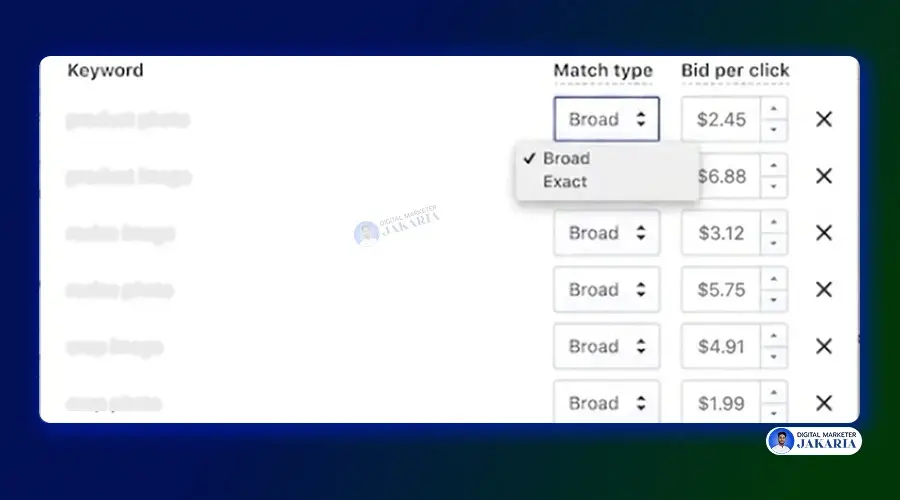
Run small-budget campaigns using Shopify Partner Ads inside the App Store with “Broad Match”. When you run ads on the seed keyword with match type ‘broad match’, Shopify will promote your app on all search terms related to the exact keyword.
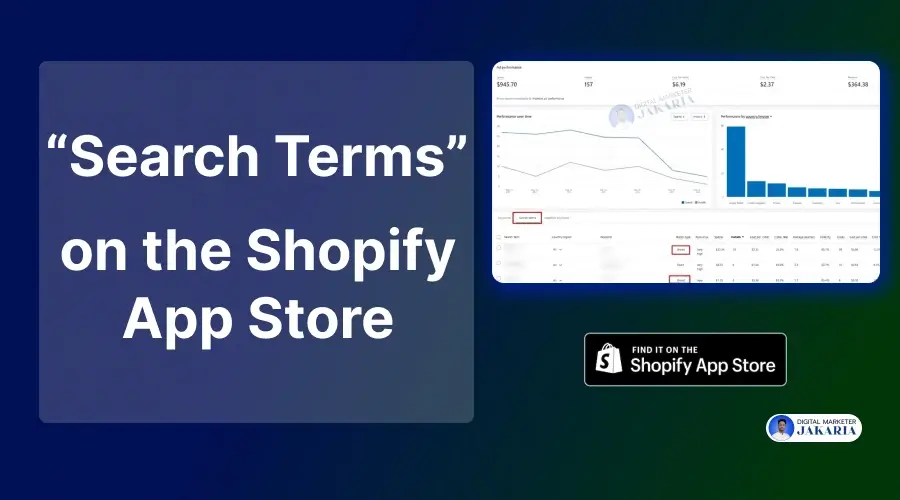
You can see all search terms that are getting impressions and clicks in the Shopify partner ads dashboard. These are proven search terms you can use on your listing page and ads to get more installs and customers.
If “upsell popup” drives higher conversion than “cross sell tool,” that data shows real intent. Use paid search data to refine your organic keyword strategy and double down on high-performing terms.
Step 3: Reverse Engineer Top Ranking Apps
Search your main keyword inside the Shopify App Store and study the top-ranking apps. Look carefully at their app card, titles, subtitles, and descriptions. Notice common words and repeated phrases. When multiple top apps use similar wording, it usually signals strong keyword relevance.
Also, pay attention to how they write. Top apps often use simple, benefit-focused language like “Increase Sales” or “Boost Repeat Orders” instead of technical terms. Learn from their structure and phrasing, but add a unique angle so your app stands out instead of blending in.
Step 4: Use Merchant Language (Not Tech Language)
Merchants do not search using technical, complex terms or product jargon. They do not type phrases like “AI-powered behavioral revenue optimization framework”. These terms may sound impressive internally, but they are not how store owners think or search.
Instead, merchants use clear, simple, result-focused words. They search for “increase sales,” “get more repeat customers,” or “stop cart abandonment.” They care about outcomes, not technical systems. Your app listing must speak their language to rank and convert.
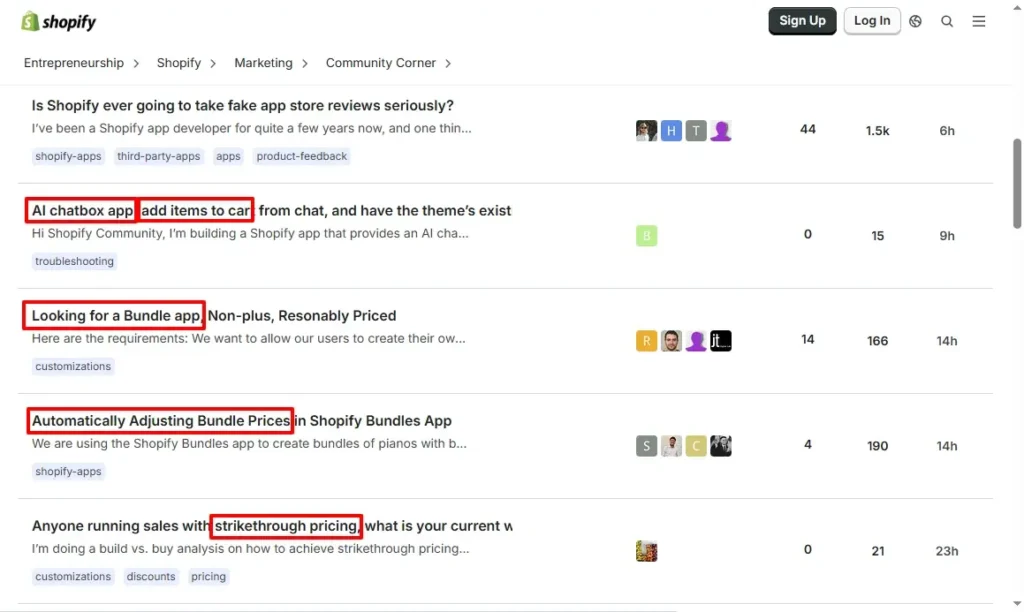
You can find real merchant language inside the Shopify Community, Facebook groups, and e-commerce forums. Read how merchants describe their problems. Use those exact phrases naturally in your title, subtitle, and description.
Step 5: Analyze Reviews for Keyword Mining
App reviews contain raw merchant language. Study 3-star and 4-star reviews carefully. They often mention unmet needs and feature gaps.
For example, a review may say, “I needed automatic bundle discounts.” That phrase can become a valuable long-tail search term for optimization and positioning.
Step 6: Track Search Terms and Ranking Over Time
Keyword research is not a one-time task. Regularly app ranking shifts, competitors are increasing, and merchant behaviour is changing. That’s why Shopify app store keyword rank tracking is crucial to stay updated and informed!
Track your search term positions regularly. Monitor install velocity alongside keyword movement. When rankings improve, and installs grow together, you confirm that the search term has real scaling potential.
How to Optimize Your Listing for Shopify App Store Search Terms
Identifying the right search terms as keywords is only your first step. Real growth happens when you strategically place those Shopify App Store search terms in your listing. Every section of your app profile sends relevance signals to the algorithm and clarity signals to merchants. Here is how you can optimize your Shopify app store listing page:
Optimize the App Name & App Card
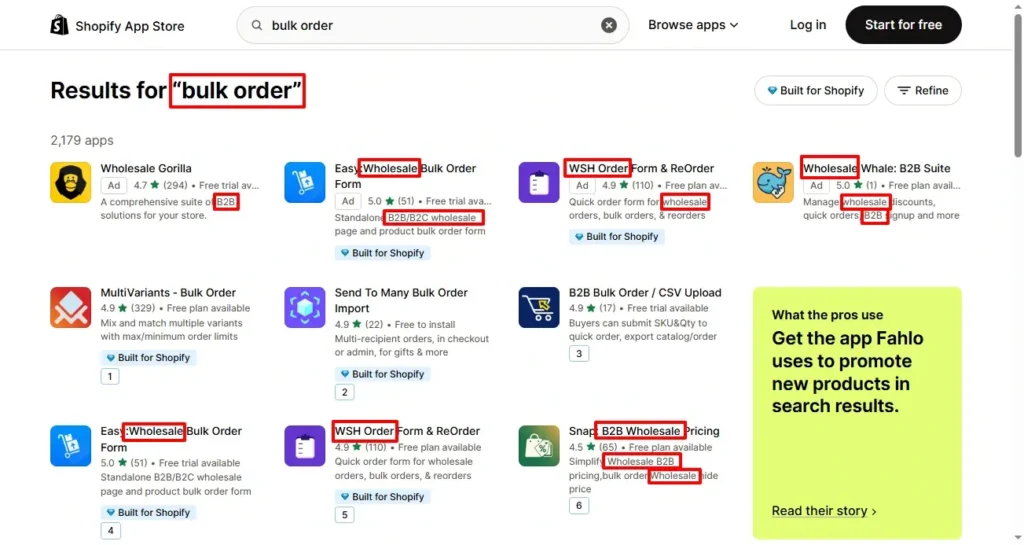
Your app name carries the strongest ranking weight on the Shopify app store. Place your primary keyword naturally in the app title. Also, keep your app card keyword-heavy, clear, and readable. Avoid stuffing multiple keywords just to rank; it goes against Shopify guidelines.
For example, instead of writing: “Ultimate Bundle Builder Discount Upsell Cross Sell App,” write something clean like: “Bundle Builder – Create Product Bundles Easily.” Clarity improves both ranking and conversion.
Optimize the Subtitle
Use the subtitle to support your primary keyword with a secondary phrase. This is your chance to expand relevance while highlighting a clear benefit.
For example: Title: “Subscription App” Subtitle: “Increase Recurring Revenue & Retain Customers.” Focus on outcomes. Merchants care about results more than features.
Optimize the Description
Use semantic variations of your main keyword throughout the description. If your main term is “bundle builder,” naturally include phrases like “product bundles,” “bundle discounts,” or “mix and match offers.”
Write for merchants first. Keep sentences simple. Address pain points clearly. When your description matches search intent and solves real problems, rankings and installs improve together.
Category & Tags Strategy
Choose your category carefully. Some categories are highly competitive and dominated by established apps with thousands of reviews. Entering those without authority makes ranking harder.
Look for ranking opportunities where demand exists, but competition is manageable. Align your category and tags with your primary search intent. Strong relevance plus smart positioning gives you a better chance to scale.
Advanced Strategy: Search Intent Mapping Framework
Basic keyword optimization is not enough in the Shopify ecosystem. To scale installs consistently, you need a structured way to map search intent. This is where a layered framework creates a competitive advantage inside the Shopify App Store.
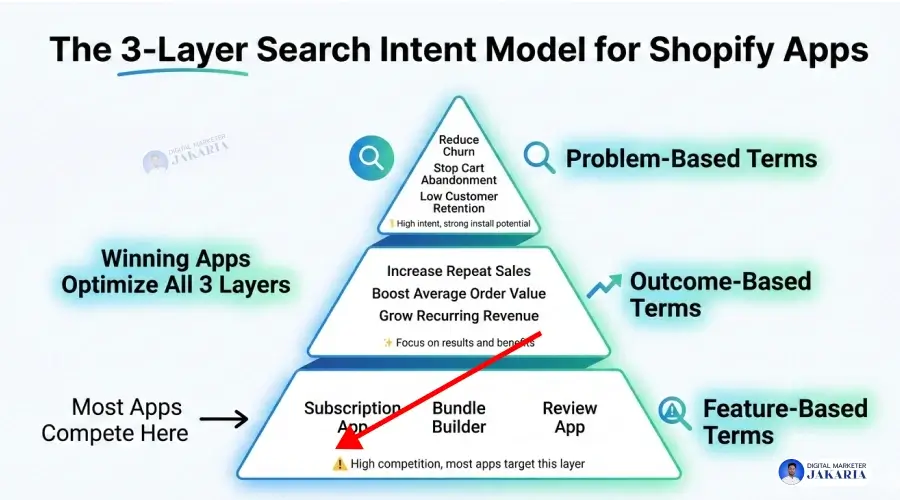
The 3-Layer Search Intent Model for Shopify Apps
Most apps only target obvious feature keywords. That limits visibility. A smarter strategy covers three different layers of merchant intent.
- Feature-Based Terms: These are direct solution keywords. Example: “subscription app,” “bundle builder,” or “review app.” These terms describe what your app does. They usually have high competition. Almost every app in the category targets them.
- Outcome-Based Terms: These keywords focus on results. Example: “increase repeat sales,” “boost average order value,” or “grow recurring revenue.” Merchants often search for outcomes, not features. When your listing reflects these benefits, relevance and conversion improve.
- Problem-Based Terms: These terms reflect pain points. Example: “reduce churn,” “stop cart abandonment,” or “low customer retention.” Problem-based searches show strong intent. Merchants actively looking to fix an issue are closer to installing a solution.
Most Shopify apps optimize only for feature-based search terms on the App Store. That creates crowded competition. Winning apps optimize across all three layers — features, outcomes, and problems/pain points. This layered alignment increases visibility, improves ranking depth, and drives more qualified installs.
Conclusion
Shopify app growth is not random or dependent on your luck. Visibility inside the Shopify App Store is driven by alignment and fulfilling the needs of merchants. When your listing matches how merchants search, your relevance increases. When relevance increases, rankings improve. When rankings improve, installs grow.
Most founders focus only on building features and making the app more complex. Smart founders focus on discoverability based on the Shopify App Store search terms. These search terms are not just keywords; they are signals of intent, pain points, and buying readiness.
If your title, subtitle, description, and visuals reflect those signals, your app becomes the obvious choice. So, optimize for features, outcomes, and problems. Track performance. Refine over time. Treat App Store ASO as a growth system, not a one-time task.
If you want predictable install growth, start with search intent and build from there.
FAQs
What are Shopify App Store Search Terms?
Shopify App Store search terms are the exact words merchants type into the search bar to find apps. These keywords reflect real needs, problems, and desired outcomes of the merchant. Optimizing your app listing around these terms improves relevance, visibility, and installs.
How Do I Rank Higher in the Shopify App Store?
Ranking improves when your app listing aligns with merchant search intent and the Shopify App Store algorithm. Use high-intent keywords in your title, subtitle, and description. Improve conversion rate from views to installs. Increase review quality and velocity. The algorithm rewards relevance, engagement, and performance, not just keyword placement.
Does Shopify App Store SEO Work like Google SEO?
No. Shopify App Store SEO is different from Google SEO. Google focuses on quality content, E-E-A-T, backlinks, and domain authority. The App Store focuses more on keyword relevance, install velocity, reviews, and conversion rate. It is closer to marketplace optimization than traditional SEO.
How Long Does It Take to See Ranking Improvement?
Shopify app store ranking changes within a few phases. In the first phase, it totally depends on your app listing page optimization, and it rewards instantly. I have optimized multiple apps with target keywords and improve unbelivable ranking, such as from N/A to 3-5 positions.
But meaningful improvement usually takes 30 to 60 days, depending on your conversion rate, performance, and reviews. Also, it depends on competition, install activity, review growth, and how strong your keyword alignment is.
Can Changing the App Title Affect Ranking?
Yes. The app title carries strong ranking weight. Updating it with a more relevant primary keyword can improve visibility. However, frequent or drastic changes may temporarily affect performance. Changes should be strategic, tested, and aligned with merchant search behavior.