You are running Shopify App Store Ads, but you are not sure if they are working or not. Your CPI (Cost Per Install) keeps rising day by day. Some days you get installs, but no one converts into paid subscribers. It feels like you are targeting the wrong audience.
I have fixed multiple Shopify App Store Ads by aligning keywords, bidding, and listing with real buyer intent. After fixing these issues, apps have been getting more installs, and the best part is that they are generating more and more revenue.
I don’t focus only on keywords or installs. I focus on install quality, conversion to paid, and revenue per install so your ads actually make money. Only your app store ads will work when you can target the right customers with the right keywords and bidding.
If you want to reduce wasted spend and get installs that turn into paying users, read this guide. I will show you how to fix targeting, lower CPI, and improve ROAS.
How Shopify App Store Ads Work
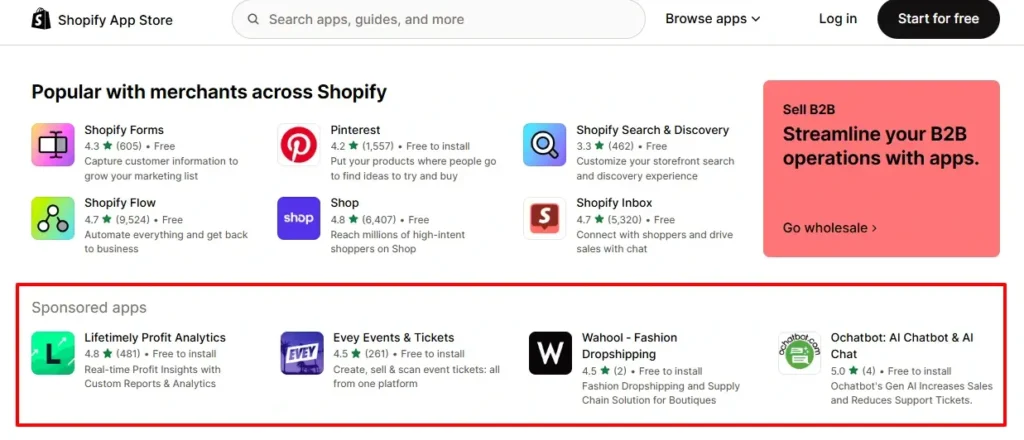
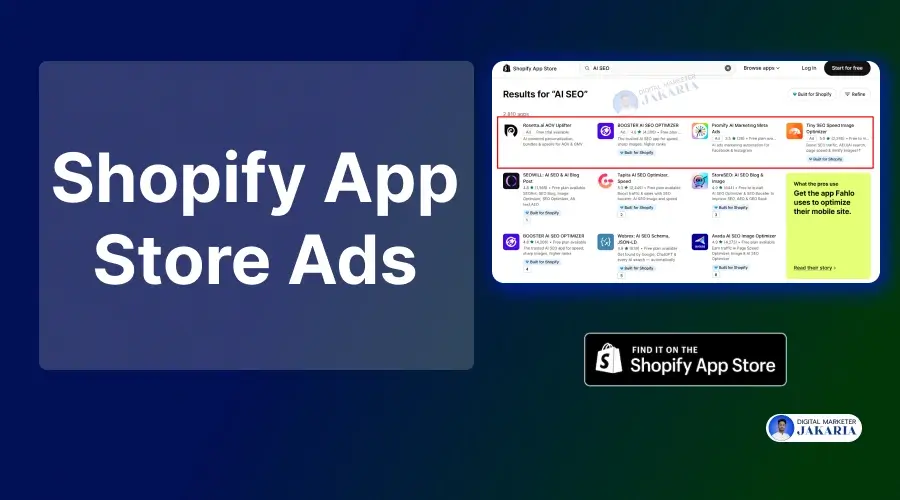
Shopify App Store Ads are not traditional ads like Meta, Google, or TikTok Ads. They are intent-driven placements inside Shopify search. When a merchant types a keyword, Shopify matches it with your bid, relevance, and listing quality. And the best part, you can market your Shopify app from scratch using this marketing channel.
There are 3 types of ad campaigns you can run on the Shopify app store:
1. Search Ads (Most profitable and scalable).
2. Category Ads (Can be an experiment).
3. Homepage Ads (High CPI).
A search ad campaign is the most profitable and scalable with proper optimization. But if you have enough budget, you can try category ads. And when your app is generating a good amount of revenue, and you want more awareness, then go for homepage ads.
I have seen several Shopify app founders think that bidding higher always wins. But the reality is bidding higher sometimes might burn you more, not win. Shopify rewards apps that convert installs, not just get clicks.
The system works like a closed loop. Keywords → clicks → installs → post-install behavior. If users install but don’t activate or convert, your performance signal drops. Then your effective visibility decreases or CPI rises.
I treat ads as a relevance engine, not just a generic traffic acquisition channel. The better your keyword-to-listing match and install-to-revenue performance, the more efficiently you scale.
Why Most Apps Fail to Generate Revenue from Shopify App Store Ads
Most Shopify apps don’t lose money because of high ad costs. They lose money because they optimize ads only for installs, not for revenue. The real failure happens after the install, not before it. Here are some common mistakes app founders often make:
- They chase low CPI instead of tracking revenue per install and payback period.
- They target broad or wrong keywords that bring low-intent users.
- Their app listing does not match the search intent, so installs don’t convert.
- They have weak onboarding, so users drop before activation.
- They don’t track keyword-level performance beyond installs.
- They scale campaigns before validating install quality and conversion to paid.
So, if you can avoid or fix these common mistakes, your Shopify app store ads would be a great user acquisition channel.
Best Shopify App Store Ads Growth Framework
I have built and refined a Shopify App Store Ads growth framework that focuses on revenue, not just installs. This framework consistently improves CPI, install quality, and ROAS for scalable growth of Shopify apps.
AIRA Framework for Shopify App Growth
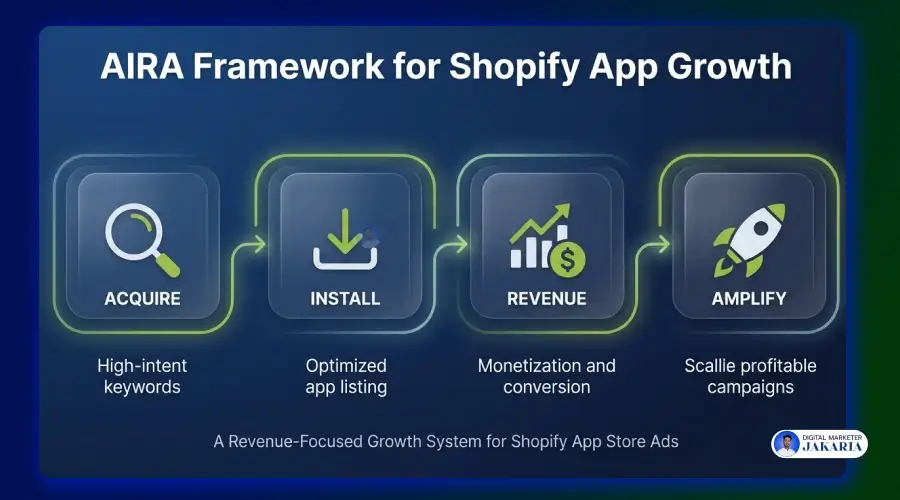
The AIRA framework connects your ads directly to revenue, not just installs. Each stage builds on the previous one, creating a system you can scale with confidence.
- Acquire – I target high-intent keywords that show real buying signals, not just traffic. This ensures you attract merchants who are more likely to convert.
- Install – I optimize the Shopify app listing to match search intent, so the right users install your app, not just random clicks.
- Revenue – I track activation, feature usage, and conversion to paid. This is where most apps fail, but this is where profit is created.
- Amplify – I scale only the keywords and campaigns that generate revenue. This reduces wasted spend and improves overall ROAS.
How to Optimize Shopify App Store Ads
Here is a step-by-step system that helps optimize App Store Ads. It will be effective in lowering CPI, improving install quality, and increasing conversion to paying users. Each step builds based on the previous one’s performance to improve overall ROAS.
Step 1: Keyword Research for Shopify App Ads
The foundation of profitable ads starts with choosing the right keywords. Not every keyword has buying intent. Some bring curiosity-driven traffic, while others signal an immediate need for a solution. If you focus on intent-driven keywords, it ensures to attract users who are more likely to install and convert.
To build a strong keyword base, analyze competitor listings, app categories, and real search behavior. Then create a group of keywords by problem type and user intent. This creates clarity in targeting and sets up the next steps for better campaign control and performance.
Step 2: Campaign Setup in Shopify Partner Dashboard
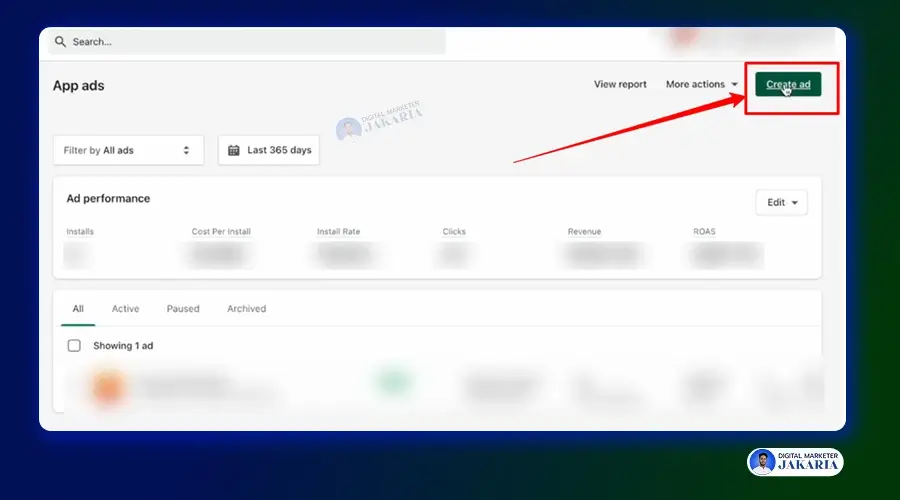
A clean campaign structure directly impacts how efficiently ads perform. Instead of placing all keywords into one campaign, segment them based on intent clusters. This allows better control over budget allocation and clearer visibility into performance.
To create the Shopify app store ad campaign, go to the “App Ads” from your partner dashboard. Then, create a New Campaign and add all keywords that you want to target. I will explain details setup guide in the upcoming steps.
Step 3: Exact Match vs Broad Match Keywords
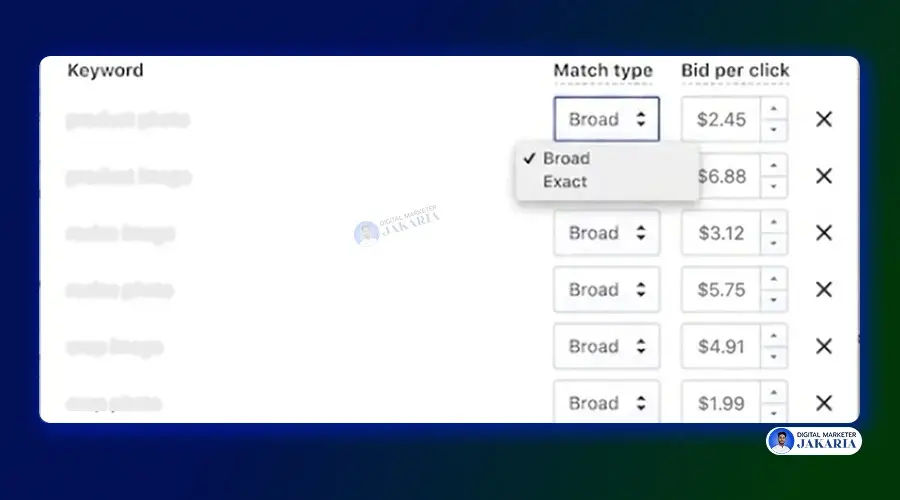
When you add keywords to the campaign, you can see two options: ‘Exact Match’ and ‘Broad Match.’ Broad match plays a key role in discovering new keyword opportunities. It helps uncover variations and App Store search terms that were not initially considered. This stage is focused on collecting data and understanding how merchants search for solutions.
Once you have identified valuable search terms, shift those search terms into an “Exact Match” keyword. It allows tighter control over spend and ensures ads appear for highly relevant searches, making scaling more predictable.
Step 4: Bidding Strategy for App Store Keywords
This is the most important part of the Shopify app store ads. Bidding should reflect the value of a keyword, not just competition. High-intent keywords deserve more aggressive bids because they are more likely to generate paying users. Lower-intent keywords should be tested with controlled budgets.
Instead of chasing top positions, focus on balancing cost and return. For example, when you need $3.50 for the position, but it needs $8.00 to chase the first spot, you should stay in the second position.
Because there are not too many differences in clicking on the first and second positions. But often it charges much higher than expected. On the other hand, if the second position requires $3.50 and the first position requires $4.00, you should go for the first spot.
Step 5: Optimizing for Lower Cost Per Install (CPI)
Reducing CPI is not just about lowering bids. It comes from improving the alignment between keyword intent and listing experience. When users find exactly what they expect, conversion rates improve, and CPI naturally decreases.
Another key factor is removing waste. Pausing irrelevant or low-performing keywords prevents budget leakage. This ensures that spend is focused on keywords that bring meaningful installs, not just volume.
Step 6: Optimize Your App Listing for a Higher Install Rate
Your Shopify app listing acts as the conversion layer between click and install. If the messaging does not match what users searched for, they will leave without installing. That’s why clear positioning is essential to capture intent-matching users.
You need to optimize the app listing page with primary and relevant keywords, compelling copy, strong visuals, etc. Remember, simple explanations and clear value propositions build trust quickly. When users immediately understand how the app solves their problem, install rates improve without increasing ad spend.
Step 7: Shopify Search Term Optimization Strategy
Real performance insights come from analyzing Shopify app store search term data. This reveals exactly which queries trigger installs and which ones waste budget. It is a continuous process, not a one-time setup.
By refining campaigns with actual data, targeting becomes more precise over time. High-performing search terms can be scaled, while irrelevant ones can be paused to improve efficiency and reduce unnecessary spend.
Step 8: Find Out High-Relevance Keywords
High-relevance keywords go beyond installs. They bring users who actively engage with the app after installation. These users explore features, start trials, and show intent to convert.
Identifying these keywords requires looking at post-install behavior, not just ad metrics. When a keyword consistently brings engaged users, it becomes a strong candidate for scaling.
Step 9: Identify Profitable Keywords & Scale
Scaling should only happen after identifying which keywords generate revenue, not just installs. Revenue per install becomes the key metric for decision-making at this stage to scale your app.
Once I can identify profitable keywords, I can set budgets and bids with confidence. This approach reduces risk and ensures growth is driven by proven performance, not assumptions.
Step 10: Measuring Shopify App Store Ads Performance & ROAS
Performance measurement should cover the full funnel, not just the top (installs). Metrics like CPI provide surface-level insights, but deeper metrics reveal true effectiveness.
Tracking activation rate, conversion to paid, revenue per install, and CLV connects ad spend to real outcomes. This allows better optimization decisions and turns ads into a predictable, scalable growth channel.
Advanced Optimization Strategies
Once you have set everything in your Shopify app store ads, apply advanced optimizations. These smart tips separate break-even campaigns from profitable growth. These strategies focus on reducing wasted spend, improving install quality, and identifying where real revenue is coming from.
Negative Keyword Filtering
A large part of wasted ad spend comes from irrelevant searches. Ads often get triggered for keywords that appear related but do not match the user’s actual intent. This leads to clicks and installs that never convert into paying users.
Filtering out these keywords improves targeting precision. Regularly reviewing search term data helps identify patterns of low-quality traffic. Set these search terms as negative keywords to ensure your budget is focused only on keywords that bring high-intent users.
Geo Targeting for Shopify Apps for App Store Ads
Geo-targeting plays a critical role in controlling ad efficiency. Many campaigns get traffic from countries where users click but rarely install or convert into paid customers. This results in silent budget leakage.
Analyzing performance by country helps identify where real value comes from. Excluding low-performing regions and focusing on high-converting markets improves overall ROAS.
Competitor Conquesting Strategy
Targeting competitor keywords can bring high-intent users who are already looking for a solution. These users are aware of the problem and are actively comparing options, which increases the chance of conversion.
However, this strategy only works when your positioning is stronger. Clear differentiation, better pricing, or a unique feature is necessary. Without that, you may attract clicks but struggle to convert users into paying customers.
Install Quality Analysis
Not all installs are equal. Some users install and leave, while others activate, engage, and convert into paying customers. Focusing only on install numbers hides this difference and leads to poor decisions.
Analyzing post-install behavior reveals which keywords and campaigns bring valuable users. Metrics like activation rate, feature usage, customer lifetime value, etc., help identify high-quality merchants.
How Shopify App Store Ads and App Store SEO Work Together
Shopify App Store Ads and ASO should not work separately. Many founders treat them as different channels. That creates slow growth. When both work together, you get organic keyword ranking growth, faster installs, and better quality users with stronger conversions.
Ads give you instant data. You see which keywords bring clicks, installs, and paid users. Then the ads help to improve organic ranking, which scales long-term. Using ad data helps you avoid guessing and focus only on keywords that actually drive results.
The real advantage comes from feedback. High-performing ad keywords should be added to your app title, description, and content. This improves organic ranking and increases visibility without increasing ad spend over time.
When both Shopify app marketing strategies are aligned, you reduce dependency on ads. Paid traffic validates what works, and App Store SEO scales it. This creates a stable growth system where installs, activation, and revenue grow together consistently.
Shopify App Ads Optimization Checklist
| Area | What to Check | Why It Matters |
| Keyword Strategy | Target high-intent, problem-based keywords | Brings users who are more likely to install and pay |
| Keyword Grouping | Segment keywords by intent in separate campaigns | Improves control and clearer performance tracking |
| Match Types | Use broad for discovery and exact for scaling | Balances learning with efficiency |
| Bidding Strategy | Adjust bids based on keyword value, not competition | Prevents overspending and improves ROI |
| Search Term Analysis | Regularly review and refine search terms | Helps remove waste and find new opportunities |
| Negative Keywords | Filter out irrelevant or low-intent queries | Reduces wasted spend and improves targeting |
| Geo Targeting | Exclude countries with clicks but no installs or revenue | Protects the budget from low-quality traffic |
| App Listing Optimization | Align title, description, and visuals with keyword intent | Increases install rate without increasing spend |
| Install Quality Tracking | Monitor activation, engagement, and conversion to paid | Ensures installs lead to real revenue |
| CPI Optimization | Improve relevance instead of just lowering bids | Maintains quality while reducing cost |
| Revenue Tracking | Measure revenue per install and payback period | Connects ad spend to actual business results |
| Profitable Keyword Scaling | Increase the budget only on revenue-generating keywords | Enables safe and predictable scaling |
| Competitor Targeting | Target competitor keywords with strong positioning | Captures high-intent comparison traffic |
| Ads + SEO Alignment | Use ad data to improve organic rankings | Builds long-term, scalable growth |
| ROAS Measurement | Track full funnel: install → activation → revenue | Gives a true picture of ad performance |
Shopify App Store Ads Benchmarks
Benchmarks help you understand if your ads are on the right track. But most founders use them the wrong way. Looking only at CPI can be misleading if you are not tracking what happens after the install.
For most Shopify apps, CPI usually ranges between $1.5 to $8, depending on the niche. Install to paid conversion often falls between 2% to 10%. Payback period typically stays within 30 to 90 days if the funnel is optimized.
These numbers are only useful when connected to your revenue. A higher CPI can still be profitable if revenue per install is strong. Focus on your own data, not just industry averages.
Do you want to optimize your Shopify app store ads that really drive high-paying users and boost your ROAS?
Conclusion
You have reached the end of the blog post, where I have explained everything you need to know before running Shopify App Store ads. Ads can drive consistent growth, but only when you treat them as a revenue system, not just an install channel.
Many founders focus on getting more installs, but most of the merchants leave the app within minutes. Sometimes, they don’t see any relevance to their problems, and sometimes it feels complex to them.
The real leverage comes from improving install quality and conversion to paid users. A strong setup starts with the right keywords, a clean campaign structure, and clear listing alignment. From there, performance improves when you track what happens after the install. Activation rate, revenue per install, and payback period are what truly define success.
I always focus on very specific and quality users who are actively finding a solution for their store. Removing low-quality traffic, focusing on high-intent users, and scaling only what generates revenue builds a predictable growth engine.
If your ads are not delivering results, the issue is not just traffic. It is the connection between acquisition, conversion, and revenue. Fix that, and Shopify App Store Ads become a powerful channel for long-term, scalable growth.
FAQs
Are Shopify App Store Ads Worth It?
Yes, but only if you focus on revenue, not installs. Ads work best for capturing high-intent users. Without proper tracking and funnel optimization, they can quickly become a cost instead of a growth channel.
How Much Do Shopify App Store Ads Cost?
Costs vary by niche and competition. Most apps see costs per install between $1.5 to $9. Total spend depends on your bidding strategy, keyword selection, and how efficiently your funnel is optimized.
What is a Good CPI for Shopify Apps?
A good CPI is not a fixed number. It depends on your keywords, competition, niche, and revenue per install. Even a higher CPI is acceptable if users convert into paying customers and recover ad spend within a reasonable time.
How Can You Reduce Cost Per Install (CPI) for Shopify Apps?
Improve keyword relevance, optimize your app listing, and remove low-performing keywords. Better alignment between search intent and your listing increases conversion, which naturally lowers CPI without sacrificing install quality.